
Check dofollow and nofollow links on any webpage for free. Scan all internal and external links at once. Get Meta Robots, X-Robots-Tag, and Robots.txt status included in every report.
Enter URL you would like to check
About the GUESTPOSTLINKS Dofollow – Nofollow Link Checker
The GUESTPOSTLINKS Dofollow and Nofollow Link Checker is a free online tool that scans any webpage and identifies all dofollow and nofollow links on that page.
Enter any URL and the tool scans every internal and external link in one report. It also shows three additional page-level signals: Meta Robots status, X-Robots-Tag, and Robots.txt — giving you a clear picture of the page’s link structure and crawl status at the same time.
This tool is built for:
- SEO professionals who need fast, accurate link data without logging into a platform
- Link builders who want to check dofollow backlinks on target sites before outreach
- Guest posters who need to confirm their published backlinks are actually passing SEO value
- Webmasters who want to audit their own pages for link structure and crawlability issues
Paste a URL, click Check Status, and get your full report in seconds.
How to Use the Dofollow – Nofollow Link Checker
Using the tool takes less than a minute. Follow these four steps to get your full link report.
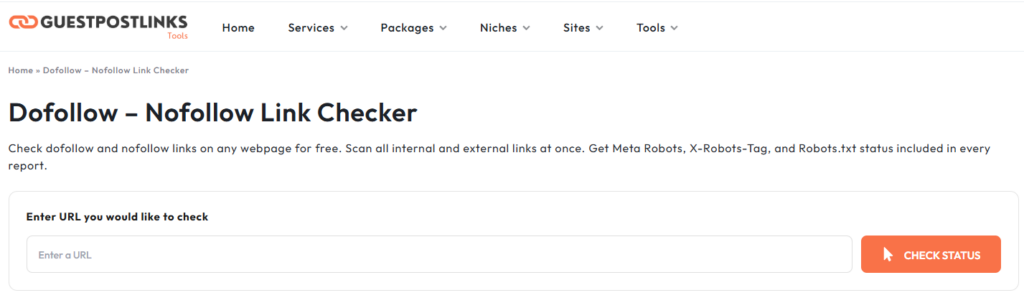
Step 1: Enter the URL
Go to the GUESTPOSTLINKS Dofollow and Nofollow Link Checker page.
In the input field, type or paste the full URL of the webpage you want to scan. Make sure the URL includes https:// or http:// at the beginning. The tool needs the complete address to crawl the page correctly.
You can check any type of page — a blog post, a homepage, a landing page, or a competitor’s article.
Step 2: Complete the reCAPTCHA
Below the input field, you will see a reCAPTCHA checkbox.
Tick the “I’m not a robot” box to confirm you are a real user. This is a one-second step that requires no account, no email address, and no personal information.
Step 3: Click Check Status
Once the URL is entered and the reCAPTCHA is complete, click the orange Check Status button.
The tool will begin scanning the page immediately. It reads the page’s HTML in real time, identifies every internal and external link, checks each link’s rel attribute, and pulls the Meta Robots, X-Robots-Tag, and Robots.txt data simultaneously.
The scan completes in a few seconds depending on the size of the page.
Step 4: Read Your Results
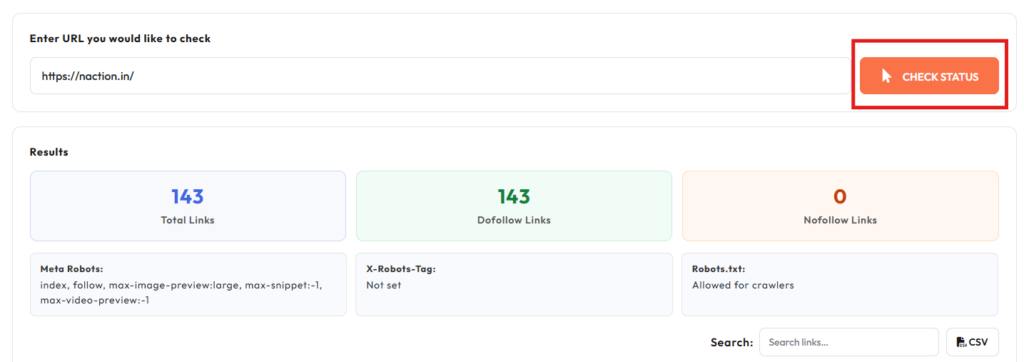
Once the scan is complete, your full report appears in the results dashboard below the tool.
You will see:
- Total Links — the combined count of all internal and external links found on the page
- Dofollow Links — the number of links passing SEO value
- Nofollow Links — the number of links not passing link equity
- Meta Robots — the page-level crawler instruction from the HTML
- X-Robots-Tag — the HTTP header-level crawler instruction
- Robots.txt — whether the page is allowed or blocked for crawlers
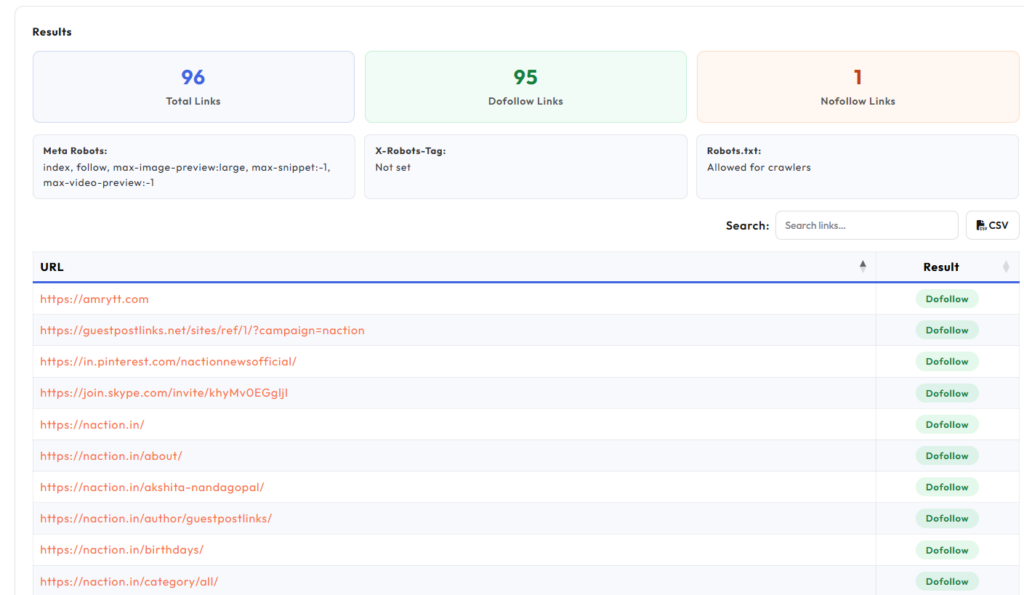
Below the summary cards, the full link table lists every link found on the page along with its type and status. Use the search field to filter results or click the CSV button to download the full report.
What Is a Dofollow Link?
A dofollow link is a standard hyperlink that tells search engines to follow it and pass SEO value from one page to another. That SEO value is commonly referred to as link equity or link juice.
When a website links to another page with a dofollow link, it is essentially telling Google: “I trust this page.” Search engines use these signals to evaluate the authority and relevance of the linked page.
By default, every link on the web is a dofollow link. A link only becomes nofollow when a website owner manually adds a specific attribute to it.
What a Dofollow Link Looks Like in HTML
A dofollow link has no special tag. It is a plain anchor tag with no rel attribute added to it.
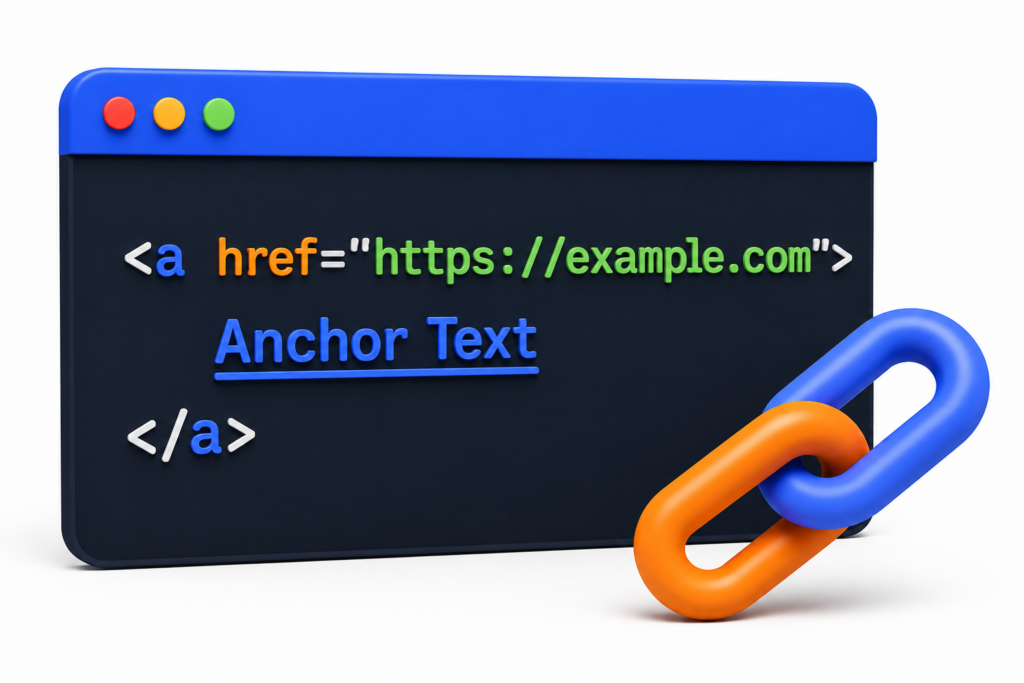
When you see a link written this way in the page source, it is a dofollow link by default.
For comparison, here is what the same link looks like when it is set to nofollow:
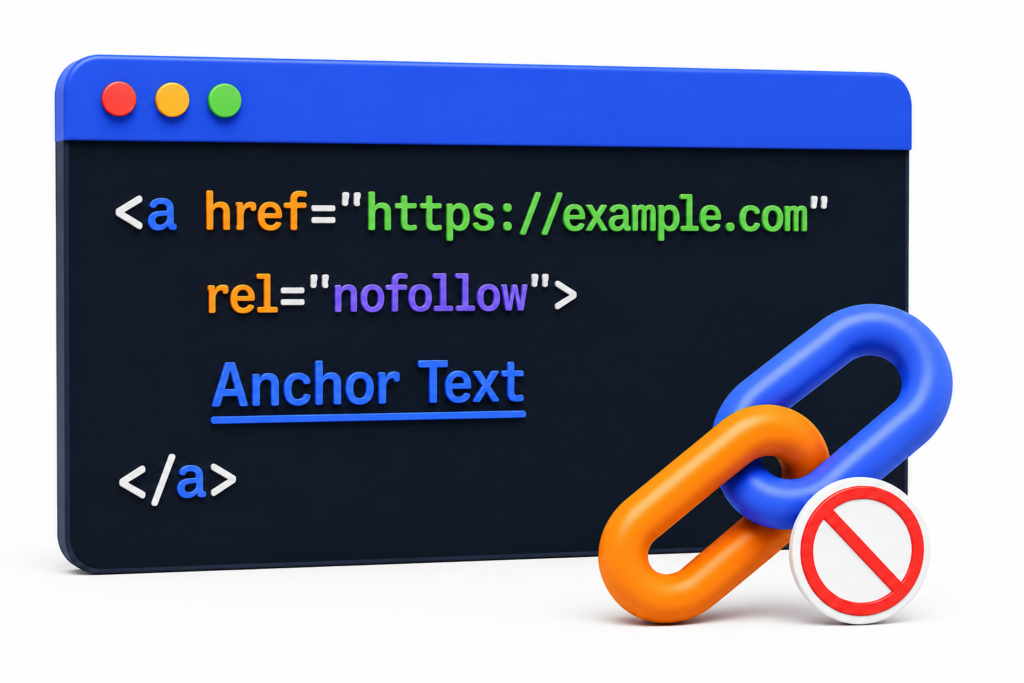
The only difference is the addition of rel="nofollow". Without that attribute, the link passes full SEO value to the destination page.
Why Dofollow Backlinks Matter for SEO
Dofollow backlinks are one of the strongest ranking signals Google uses to evaluate a webpage.
When a trusted, high-authority website links to your page with a dofollow link, it passes a portion of its authority to your site. Over time, earning dofollow backlinks from relevant and credible sources helps your pages rank higher in search results.
This is why link building focuses heavily on acquiring dofollow links. A single dofollow backlink from a well-established website can have more impact on your rankings than dozens of nofollow links from low-authority sources.
Three factors determine how much value a dofollow backlink passes:
- Domain authority of the linking site
- Relevance of the linking page to your topic
- Placement of the link within the content (editorial links carry more weight than footer or sidebar links)
How to Check Dofollow Backlinks on Any Page
You do not need to read through hundreds of lines of HTML to check dofollow backlinks on a page.
Use the GUESTPOSTLINKS Dofollow and Nofollow Link Checker. Paste the URL of any webpage into the tool and click Check Status. The tool scans every link on that page and shows you a clear breakdown of all dofollow and nofollow links instantly.
This is useful when:
- You want to verify a guest post link is dofollow after it goes live
- You want to check a target website’s linking behavior before outreach
- You want to audit your own page’s internal and external link structure
What Is a Nofollow Link?
A nofollow link is a hyperlink that contains a specific rel attribute telling search engines not to pass SEO value to the linked page.
When a website adds rel="nofollow" to a link, it instructs Google and other search engines to ignore that link for ranking purposes. The link still exists on the page and users can still click it, but it does not transfer link equity to the destination page.
Nofollow links are commonly found in blog comment sections, forum posts, sponsored content, and user-generated content areas where website owners want to avoid passing SEO value to unverified external sources.
What a Nofollow Link Looks Like in HTML
A nofollow link is a standard anchor tag with a rel="nofollow" attribute added to it.
Some pages use multiple rel values together in a single attribute:
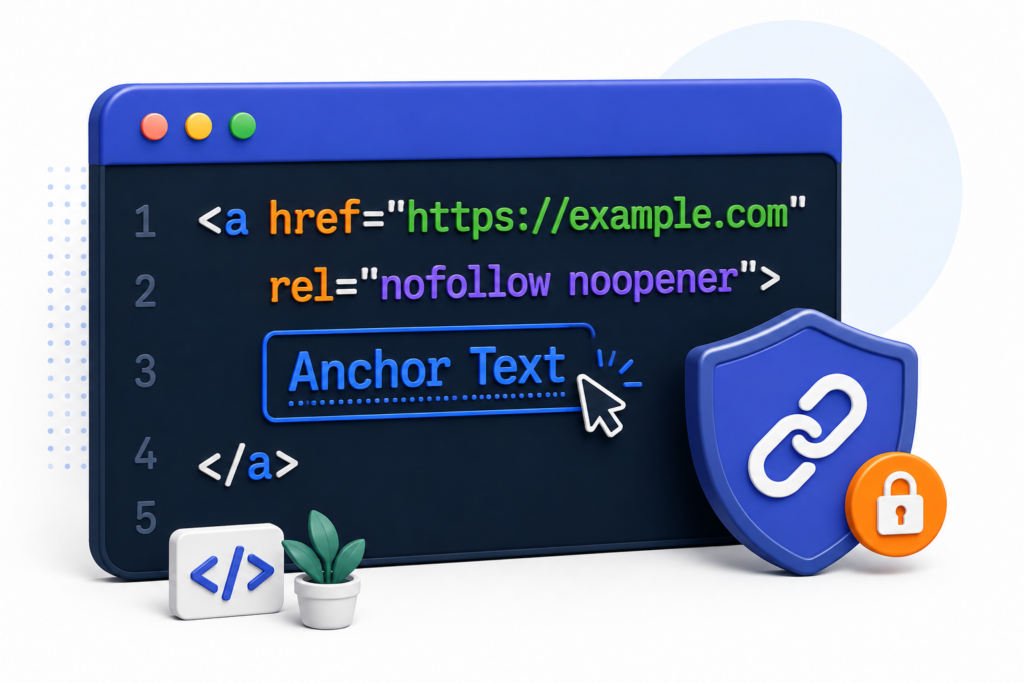
Both versions are treated as nofollow by search engines. The noopener part is a security attribute that has nothing to do with SEO. It simply prevents the linked page from accessing the original page’s browser data.
If you see either of these patterns in the page source, the link is nofollow and is not passing SEO value.
rel=”sponsored” and rel=”ugc” — What They Mean
Google introduced two additional rel attributes in 2019 to give webmasters more specific ways to classify their links.
rel=”sponsored”
This attribute should be used on any link that is paid for or part of an advertising or sponsorship arrangement.
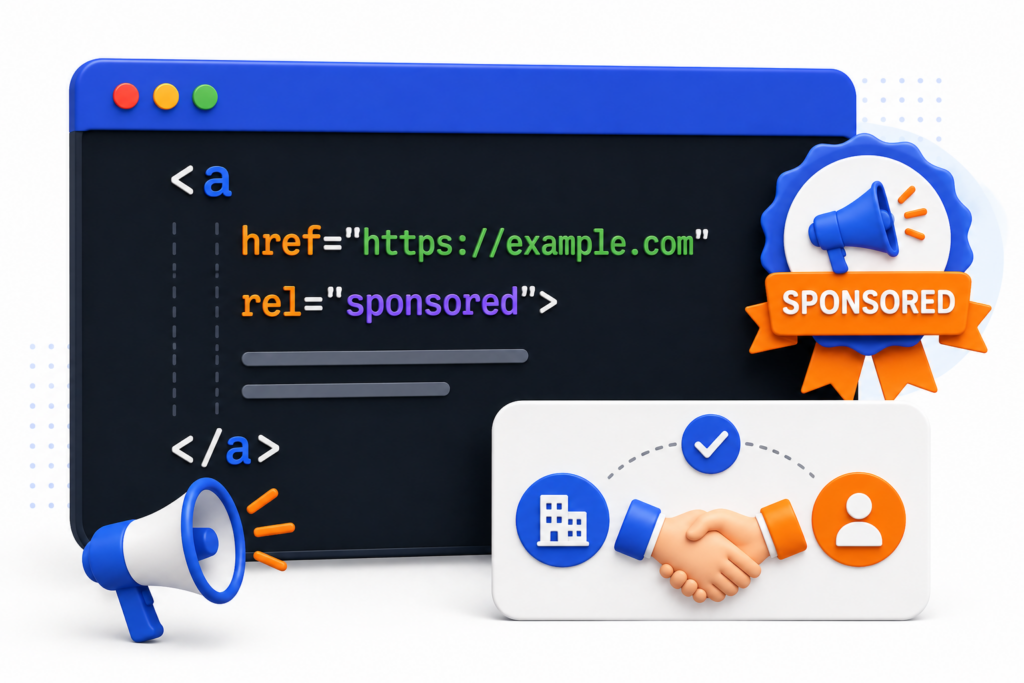
If your website publishes paid guest posts or sponsored content, links inside that content should carry this attribute. Using rel="nofollow" on paid links is still acceptable, but rel="sponsored" is the more accurate and recommended option.
rel=”ugc”
UGC stands for User-Generated Content. This attribute is meant for links that appear in areas where users submit their own content, such as comment sections or community forums.
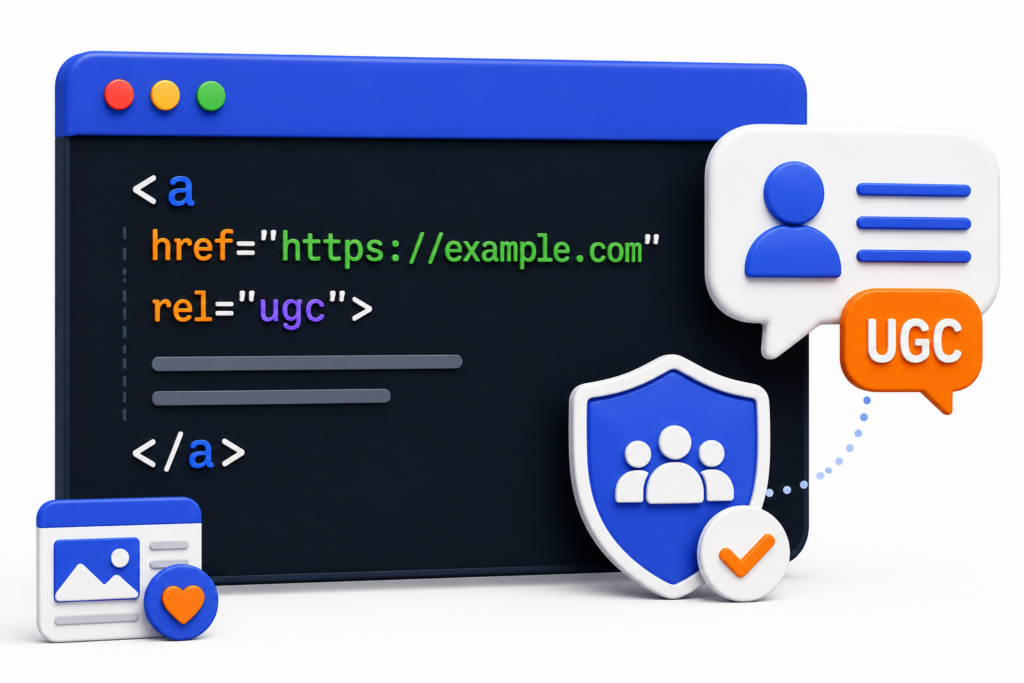
Google treats both rel="sponsored" and rel="ugc" as hints in the same way it treats rel="nofollow". None of these attributes guarantee that Google will ignore the link entirely, but they provide important context about where the link comes from and why it exists.
Do Nofollow Links Still Have SEO Value?
The short answer is: not directly, but they are not worthless either.
In 2019, Google updated its stance on nofollow links. Instead of treating them as a strict instruction to ignore, Google now treats them as a hint. This means Google may still choose to follow and evaluate some nofollow links depending on the context and authority of the linking page.
Beyond that, nofollow links still provide value in other ways:
- Referral traffic — users can still click nofollow links and land on your page
- Brand visibility — nofollow mentions from high-traffic sites increase awareness
- Natural link profile — a backlink profile made up entirely of dofollow links can appear unnatural to search engines
A balanced mix of dofollow and nofollow backlinks is a signal of a natural, credible link profile. Nofollow links from authoritative sources still carry indirect benefits even when they do not pass direct link equity.
Why Should You Check Dofollow and Nofollow Links?
Publishing a guest post takes time and effort. But getting the link placed is only part of the job. The next step is confirming that the link is actually dofollow and passing SEO value to your site.
Some websites set all outbound links to nofollow by default. Others change a link’s status after publishing without notifying the contributor. If you do not check, you may never know.
Running the page URL through the GUESTPOSTLINKS Dofollow and Nofollow Link Checker after your guest post goes live gives you instant confirmation. You can see whether your backlink is dofollow, nofollow, or tagged as sponsored — and take action if something is not right.
Audit Your Own Page’s Link Structure
The links on your own pages matter just as much as the backlinks pointing to your site.
Internal links that are unintentionally set to nofollow can block link equity from flowing through your website. External links pointing to low-quality sources can hurt your credibility.
Auditing your own pages helps you:
- Confirm that important internal links are dofollow and passing equity correctly
- Identify any external links that should be tagged as nofollow or sponsored
- Spot pages where link flow is being blocked unintentionally
This is especially useful after a site migration, theme update, or plugin change, all of which can alter link attributes without warning.
Research Competitor Pages Before Outreach
Before pitching a website for a guest post or link placement, it helps to know how that site handles its outbound links.
Paste the target page URL into the tool and check how many of its outbound links are dofollow. If a site sets most of its links to nofollow, a guest post placement there may deliver less SEO value than expected.
This gives you the data to make smarter outreach decisions and focus your time on sites that actually pass link equity.
Keep Your Backlink Profile Natural and Balanced
A healthy backlink profile contains a mix of both dofollow and nofollow links. A profile with only dofollow links can appear unnatural to search engines and may attract unwanted scrutiny.
Regularly checking the link types pointing to your pages helps you understand the overall composition of your backlink profile. If the balance looks off, you can adjust your link building strategy accordingly.
A natural profile is one of the clearest signals to Google that your links were earned organically rather than manipulated.
Catch Sponsored or UGC Links That Need Proper Tagging
Google requires that paid links and links inside user-generated content are tagged correctly using rel="sponsored" or rel="ugc". Using a plain dofollow link for a paid placement violates Google’s link spam policies.
If you run a website that publishes sponsored content or accepts guest posts for payment, checking your outbound links regularly helps you stay compliant. Any paid link that is missing the correct rel attribute should be updated immediately. The tool makes this check fast and straightforward. Scan the page, review the link types in the results, and confirm every paid or user-generated link carries the right attribute.
Benefits of Using the Dofollow and Nofollow Link Checker Tool
Verify Link Type Instantly
You do not need to open the page source or read through lines of HTML code to check if a link is dofollow or nofollow.
Paste the URL into the tool, click Check Status, and get a full breakdown of every link on that page in seconds. Each link is clearly labeled as dofollow or nofollow so you can act on the data right away.
Spot Crawl Issues Before They Hurt Rankings
Every scan includes three page-level signals that go beyond basic link checking:
- Meta Robots — shows whether the page is set to index, follow, noindex, or nofollow at the meta tag level
- X-Robots-Tag — shows crawler instructions set at the HTTP header level
- Robots.txt — confirms whether the page is allowed or blocked for search engine crawlers
These three signals together tell you if a page has any crawlability issues that could be preventing it from ranking, even before you look at the links.
Confirm Guest Post Links Are Live and Working
After your guest post goes live, run the page URL through the tool to verify your backlink.
You can confirm whether the link is dofollow, check the anchor text is correct, and make sure the link has not been changed to nofollow after publication. This step takes less than a minute and gives you full confidence that your link building effort is delivering real SEO value.
Audit Internal and External Links Together
Most link checkers only show you outbound external links. This tool scans every link on the page — both internal and external — in a single report.
That means you get a complete picture of how link equity is flowing across the entire page, not just where it is going outside your site.
Save Time with CSV Export
Once the scan is complete, you can download the full results as a CSV file in one click.
This makes it easy to share link data with your team, include it in a client report, or import it into a spreadsheet for further analysis. No manual copying. No reformatting.
Analyze Competitor Pages Before Outreach
Before reaching out to a website for a guest post or link placement, scan their page with the tool first.
You can see exactly how their outbound links are set up — how many are dofollow, how many are nofollow, and whether their paid links are tagged correctly. This helps you decide if a placement on that page is worth pursuing before you spend time on outreach.
Free, No Login, No Installation
The tool is completely free to use.
There is no account to create, no software to install, and no subscription required. Open the page, paste a URL, and get your results. Every feature — including CSV export, crawl signal data, and the full link breakdown — is available to every user at no cost.
What Makes Our Tool Different
The GUESTPOSTLINKS Dofollow and Nofollow Link Checker is built to give you more than just a basic link type check. Here is a full breakdown of what the tool includes and why each feature matters.
Scans Both Internal and External Links
Most link checkers only show you external outbound links. This tool scans every link on the page — internal and external — and displays them all in one clean report.
This gives you a complete view of how link equity moves across the entire page, not just where it exits the site.
Meta Robots Status
Every scan includes the Meta Robots tag from the page being checked.
This tells you exactly how the page is instructing search engines to treat it — whether it is set to index, follow, noindex, or nofollow. Spotting a misconfigured Meta Robots tag early can prevent a page from being invisible in search results without any obvious reason.
X-Robots-Tag
The X-Robots-Tag is a crawler instruction set at the HTTP header level, separate from the Meta Robots tag inside the HTML.
This tool reads and displays that header so you can see both levels of crawler instructions in one place. Most link checkers do not check this at all.
Robots.txt Status
The tool also checks the Robots.txt file for the page you are scanning and tells you instantly whether that page is allowed or blocked for search engine crawlers.
This is a quick but important check. A page blocked in Robots.txt will not be crawled or indexed regardless of how well it is optimised.
Search and Filter Results
For pages with a large number of links, the results table includes a built-in search and filter function.
You can type any keyword, domain, or anchor text directly into the search field to find specific links inside the full results set. No need to scroll through hundreds of rows manually.
CSV Export
The full link report can be downloaded as a CSV file in one click.
You can open it in Excel or Google Sheets, share it with a client, include it in an SEO report, or pass it to a team member for further review. The export includes every link found on the page along with its type and status.
No Login. No Installation. Completely Free.
Every feature in this tool is available without creating an account, downloading software, or entering payment details.
Use Cases for the Dofollow – Nofollow Link Checker
Guest Posting Verification
You put time and effort into getting a guest post published. The last step is making sure the link inside that post is actually dofollow and passing SEO value to your site.
After your guest post goes live, paste the page URL into the tool and run a scan. You will see immediately whether your backlink is dofollow, nofollow, or tagged as sponsored. If the link has been changed or set incorrectly, you will know straight away and can follow up with the site owner before more time passes.
This is one of the most practical uses of the tool for anyone doing active link building through guest posting.
Competitor Backlink Analysis
When you find a competitor’s page that is ranking well, it helps to understand the links on that page and how they are structured.
Paste the competitor’s page URL into the tool and scan it. You can see how many of their outbound links are dofollow, identify which external sites they are linking to, and check the overall link profile of the page. This data helps you understand what a well-linked page in your niche looks like and gives you a clearer picture of the standard you are working toward.
Sponsored Link Compliance
If your website publishes paid content, sponsored posts, or accepts guest posts in exchange for payment, the outbound links inside that content must carry the rel="sponsored" attribute as per Google’s link spam policies.
Use the tool to scan any page that contains paid placements and check the rel attributes on outbound links. Any paid link showing as a plain dofollow link without the sponsored tag should be updated immediately to stay compliant and avoid potential penalties.
Pre-Outreach Research
Before you spend time writing a pitch or preparing content for a target website, it is worth checking how that site handles its outbound links.
Paste the URL of a page on the target site into the tool and review the results. If the site sets most of its outbound links to nofollow, a placement there may not deliver the SEO value you are looking for. If the links are dofollow and the site looks clean in the crawl data, it is a stronger candidate for outreach.
This one check can save hours of effort spent on placements that deliver little return.
Internal Linking Audit
Internal links are one of the most effective ways to pass link equity between your own pages and guide search engines through your site structure.
Scanning your own pages with this tool lets you see exactly how your internal links are set up. You can confirm that important pages are receiving dofollow internal links, spot any pages where link equity is being blocked unintentionally, and identify internal links that are incorrectly set to nofollow.
This is especially useful after a site update, theme change, or CMS migration where link attributes can change without warning.
Frequently Asked Questions
A dofollow link passes SEO value (link equity) from the linking page to the destination page. It tells search engines to follow the link and count it as a ranking signal. A nofollow link contains a rel="nofollow" attribute that instructs search engines not to pass link equity to the destination page. Nofollow links can still drive referral traffic but do not directly contribute to search rankings.
Paste the URL of the page where your backlink is placed into the GUESTPOSTLINKS Dofollow and Nofollow Link Checker and click Check Status. The tool scans the page and displays every link along with its type. You will see clearly whether your backlink is dofollow, nofollow, sponsored, or ugc.
Yes. The tool scans every link on the page — both internal links pointing to other pages on the same website and external links pointing to other domains. All links are displayed together in one report with their type and status clearly labeled.
The Meta Robots result shows the crawler instructions set inside the HTML of the page you scanned. Common values include:
index, follow — the page can be indexed and its links can be followed
noindex — search engines are told not to include this page in search results
nofollow — search engines are told not to follow the links on this page
noindex, nofollow — the page should neither be indexed nor have its links followed
A misconfigured Meta Robots tag is one of the most common reasons a well-optimised page fails to appear in search results.
“Allowed for crawlers” means the page is not blocked in the website’s Robots.txt file. Search engine bots are permitted to crawl and access that page. If the result shows “Blocked,” it means the Robots.txt file contains a rule that prevents crawlers from accessing the page, which would stop it from being indexed regardless of its content or link profile.
Yes. Once the scan is complete, click the CSV button in the results table to download the full report as a CSV file. You can open this file in Excel or Google Sheets for further analysis, client reporting, or team sharing.
The tool scans the actual HTML of the target page in real time and reads the rel attributes directly from the source code. This means the results reflect the current live state of the page at the time of the scan, not cached or outdated data.
Yes. The GUESTPOSTLINKS Dofollow and Nofollow Link Checker is completely free. Every feature, including the full link breakdown, crawl signal data, search filter, and CSV export, is available at no cost with no usage limits.
No. The tool requires no account, no email address, and no personal information. Open the page, paste a URL, complete the reCAPTCHA, and click Check Status. Your results are ready in seconds.
Yes. You can scan any publicly accessible webpage, including competitor pages. Paste the competitor’s page URL into the tool to see the full link breakdown, crawl signals, and link types on that page. This is useful for pre-outreach research and understanding how well-ranking pages in your niche are structured.
 No products in the cart.