
Use our free Meta Tag Generator to create meta titles, meta descriptions, and meta keywords for your website in seconds. Our tool generates clean HTML meta tags for SEO that you can copy and use instantly.
Perfect for SEO professionals, bloggers, and website owners, our SEO meta tags generator also supports robots rules, charset selection, language tags, and author details for complete meta tag setup.
Generated meta tags
Enter your page details on the left, then click Create meta tags.
What Are HTML Meta Tags?
HTML meta tags are short pieces of code placed inside the <head> section of a web page. They provide important information to search engines and browsers, meta tags are not visible to users.
Meta tags help search engines understand page content, control how pages appear in search results, and improve click-through rates.
The most important types are meta title, which defines the page title shown in Google, and meta description, which summarizes the page content. Other key tags include meta robots (controls indexing), meta charset (defines text encoding), and meta viewport (ensures mobile responsiveness).
Although meta tags do not directly improve rankings, they play a critical role in SEO and user experience. Well-written meta tags make pages clearer, more clickable, and easier for search engines to process. Using unique, clear, and keyword-focused meta tags helps improve visibility and overall site performance.
What Is a Meta Tag Generator?
A meta tag generator is a simple online tool that helps you create HTML meta tags for your website pages without writing code manually. These meta tags provide search engines and users with important information about your page content.
Instead of typing complex HTML code, you just enter basic details like your page title and description, and the tool generates ready-to-use meta tags for you.
What Does a Meta Tag Generator Do?
A meta tag generator automatically creates properly formatted meta tags based on the information you provide. These tags are placed inside the <head> section of a webpage and help search engines understand what the page is about.
The generator ensures:
- Correct syntax
- Proper length for SEO
- Clean and readable output
This makes it easier to optimize pages for search engines without technical knowledge.
What is Meta Title?
The meta title (also called title tag) is the clickable headline that appears in search engine results and browser tabs. It tells users and search engines what the page is about.
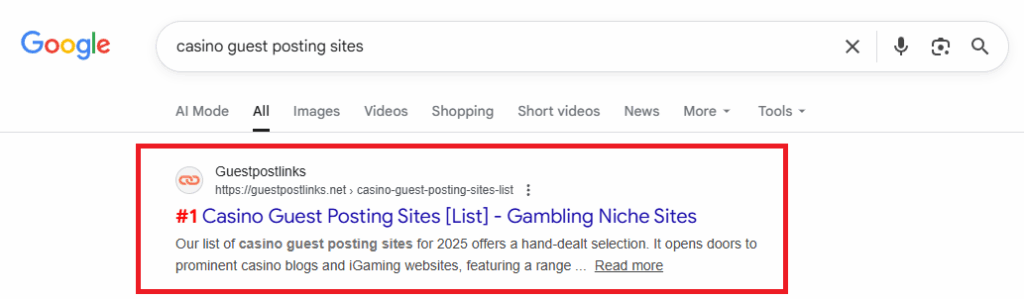
Best practice:
- Keep it under 60 characters
- Include your main keyword
- Make it clear and relevant
Example:
<title>List Of Construction & Repairing Guest Posting Sites</title>What is Meta Description?
The meta description is a short summary of your page that appears below the title in search results. While it does not directly affect rankings, it strongly impacts click-through rates.
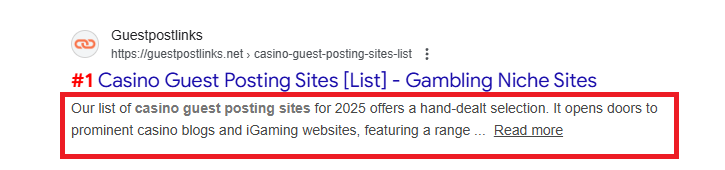
Best practice:
- Keep it between 150–160 characters
- Make it informative and engaging
- Match the page content
Example:
<meta name="description" content="Explore our 2025 list of construction and repairs guest posting sites at GUESTPOSTLINKS. Boost your SEO and expand your reach in the construction industry">What is the Meta Keyword?
The meta keyword tag was used in the past to list keywords related to a page. Today, most search engines ignore it, but some users still include it for reference or internal use.
Best practice:
- Do not stuff keywords
- Use only relevant terms
- Optional for modern SEO
Example:
<meta name="keywords" content="meta tag generator, SEO tools, meta tags">Our meta tag creator, meta description and meta keyword generator is a helpful tool for creating clean, SEO-friendly meta tags quickly and correctly. It removes the need for manual coding and makes on-page optimization accessible to everyone.
How to Create Meta Tags for Your Website
Create SEO-friendly meta tags in seconds using our Meta Tag Generator. Just enter your page details, choose basic settings, and the tool will instantly generate clean HTML meta tags ready to use on your website.
- Step 1: Enter Page Title: Add your website or page title. The tool shows character limits to keep it SEO-friendly.
- Step 2: Add Description & Keywords: Write a brief page description and enter your keywords, separated by commas.
- Step 3: Choose Robots Settings: Decide if search engines should index your page and follow its links.
- Step 4: Select Charset & Language: Pick a character encoding (like UTF-8) and your site’s main language.
- Step 5: Set Revisit Frequency & Author: Choose how often search engines should revisit your page and add an author name if needed.
- Step 6: Generate Meta Tags: The tool instantly creates optimized HTML meta tags. Copy and add them to your site.
Key Features of Meta Tag Generator
Our Meta Tag Generator helps you create SEO-friendly HTML meta tags quickly and easily. It’s designed for both beginners and SEO professionals who want clean, accurate results without coding.
- Meta Title, Description & Keyword Generator: Generate optimized meta titles, meta descriptions, and keywords using built-in character limits. The tool works as a reliable meta description generator and meta keyword generator.
- Robots Index & Follow Control: Easily choose index or noindex, follow or nofollow options to control how search engines crawl and display your pages.
- Charset & Language Selection: Select the correct charset (UTF-8, UTF-16, ISO, Windows) and set your site’s primary language for better compatibility and SEO.
- Author Meta Tag Support: Add an author meta tag to define content ownership and improve credibility.
- Clean, Copy-Paste HTML Output: Get lightweight, well-structured HTML meta tags that follow SEO best practices and are ready to copy and paste into your site.
How to Add Meta Tags to Your Website
Wondering Where to add Meta Tag in Website? Here we added methods that explain where you can use our meta tag optimization tool according to your website type.
Method 1: Manual HTML Implementation
Best for: Custom or static HTML websites
If you have direct access to your website’s source code, add meta tags inside the <head> section of your HTML file.
Example:
<!DOCTYPE html>
<html>
<head>
  <!-- Meta tags go here -->
  <meta charset="UTF-8">
  <meta name="description" content="A brief summary of your page.">
  <meta name="keywords" content="meta tags, SEO, website optimization">
  <title>Your Page Title</title>
</head>
<body>
  <!-- Visible website content -->
</body>
</html>
This method gives full control but requires basic HTML knowledge.
Method 2: Adding Meta Tags via CMS Platforms
Best for: Non-technical users
Most content management systems allow you to add meta tags without touching code.
Examples:
- WordPress: Use SEO plugins like Yoast SEO or Rank Math. These plugins provide fields for SEO title and meta description directly inside the page or post editor.
- Wix: Go to Pages & Menu, click the page’s More Actions, then select SEO Basics to add your meta title and description.
- Squarespace: Open page settings, select the SEO tab, and enter your meta information. Site-wide settings are available under Marketing → SEO Appearance.
- Shopify: Edit any product or page and scroll to the Search engine listing section to add meta tags.
Method 3: Using Page Builders
Best for: Visual editors
Page builders like Elementor or Divi work alongside SEO plugins or built-in SEO settings. You simply enter meta information while designing the page, and the system places the tags correctly.
Why Meta Tags Belong in the <head> Section
- Invisible to visitors: Meta tags are meant for search engines and browsers, not users.
- Proper page rendering: Browsers read meta data (charset, viewport, SEO info) before loading visible content.
- SEO compliance: Search engines expect meta tags to be processed from the header area.
Even if you never see or edit the <head> section yourself, modern platforms handle placement automatically.
Frequently Asked Questions (FAQs)
A meta tag generator is an online tool that helps you create optimized meta titles, descriptions, and other SEO tags without needing technical or coding knowledge.
Most meta tag generators are free to use and allow you to generate basic SEO tags instantly, though some advanced features may require payment.
No, most meta tag generators do not require sign-up and can be used directly without creating an account.
Meta tag generators help improve SEO indirectly by creating optimized titles and descriptions that enhance visibility, indexing, and click-through rates.
Yes, meta tag generators are designed for beginners and require no technical skills or prior SEO experience.
 No products in the cart.